• Skip to content
  • Skip to footer
  • WEBMAIL
  • SMARTHUB

SRT.COM

  • INTERNET
  • SECURITY
  • PHONE
  • BUSINESS
  • TV

Tom Thomas

CUSTOMER ALERT

Jan 15 2020

CUSTOMER ALERT

CUSTOMER ALERT
Fake Apps Are Real Problem Be warned: Scammers are making fake versions of popular apps to try and steal your personal data, so it’s important to do your homework before downloading any app. How can you spot a fake app — the kind designed to get malware onto your device? Take these precautions:
  • Do some research. A developer with few reviews or downloads could just be starting out. On the other hand, they could be a scammer intent on tricking you into downloading the app. Perform an internet search on the app and the developer. Most legitimate developers will have a website that showcases the app and any additional apps that company has made.

  • Read the available app reviews. If they seem short and nondescript, chances are good that the app is a scam. Also look for reviews from users that were previously duped by the app.

  • Notice the details. Do the images of the app look professional? Good design can indicate a good app, since scammers are usually in a rush and simply throw images together. Look for mismatched fonts, misspellings, and non-symmetrical placement of logos and images.

  • Check for thorough explanations and details. Does the developer say exactly what the app does? Legitimate app developers will provide a clear explanation of instructions and features of the app.

  • Watch for clones of popular, established apps. Examine the name of the developer to see if it matches up with the app. Note the number of reviews — hugely popular apps will have hundreds, if not thousands, of user reviews.
PrevPreviousSITES OF THE MONTH
NextCOOKING DEMONext

SITES OF THE MONTH

Jan 15 2020

SITES OF THE MONTH

SITES OF THE MONTH
New Year's Resolutions  
New Year’s Resolutions
Be inspired with these ideas for resolutions that are actually achievable and will lead to happier living.
Learn more…
Make Your Best Home  
Make Your Best Home
Pick up tips and tricks for all kinds of home improvement projects, from interior decorating to creative storage.
Learn more…
Explore the World  
Explore the World
National Geographic’s stunning photos and videos allow you to see the world without having to leave your home.
Learn more…
PrevPreviousMUST-SEE VIDEOS
NextCUSTOMER ALERTNext

MUST-SEE VIDEOS

Jan 15 2020

MUST-SEE VIDEOS

MUST-SEE VIDEOS
Cool Video 1 - Download Graphics to View  
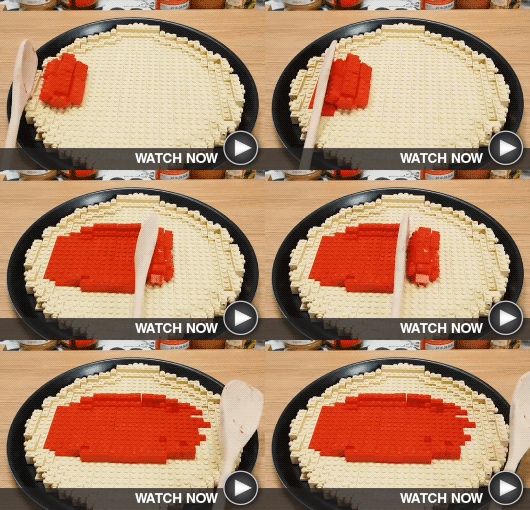
Perfectly Playful Plastic Pizza
No matter how you slice it, this stop-motion video successfully imagines the process of making and baking a Lego® brick pizza.
Cool Video 2 - Download Graphics to View  
Nerf Trick Shots
You’ll have a blast watching what these fun-loving guys can do with Nerf Blasters — hitting impossible shot after impossible shot.
PrevPreviousBeauty: Powered by Broadband
NextSITES OF THE MONTHNext

TUTORIAL/FAQ

Dec 18 2019

TUTORIAL/FAQ

FAQ/TUTORIAL
Download Graphics to View Question: Last year I made a New Year’s resolution to be better about computer security. This year I want to focus on regular computer maintenance. Any suggestions for me?

Answer: Yes, you should be doing regular maintenance on your computer just as you do on your car. The new year is a great time to get started. Here are some tips:

Do backups often. If you’re not already performing regular backups, resolve to start now. Ideally, copy files to an external hard drive and upload copies to the cloud. That way, you won’t lose much if something goes wrong with your computer.

Restart your computer at least weekly. Random Access Memory (RAM) is your computer’s main type of memory and it’s constantly in flux. When you restart your computer, you enable it to run much faster by flushing out the random, unimportant, and temporary data bogging it down.

Stop eating and drinking near your computer. Granted, snacking while computing can be a difficult habit to break. But it’s worth the effort since you can do a lot of damage by spilling a cup of coffee or dropping crumbs between the keys.

Clean the screen and keyboard regularly. Dust, hair, and other debris can adversely affect your computer’s performance. Dust large areas with a microfiber cloth and use a small clean paintbrush to wipe keys and small crevices. Canned air also works well to dislodge dust and small particles that are difficult to remove.

Close programs you’re not currently using. When you run too many programs simultaneously, your computer may slow down or even freeze.

BONUS TIP: Give your eyes and joints a break. While you’re caring for your computer, make sure to care for yourself too. Set a timer to remind yourself to get up, walk around, and gaze at distant objects for a few minutes out of every hour.

CRAFTY IDEAS

Dec 18 2019

CRAFTY IDEAS

<!-- CRAFTY IDEAS -->” width=”640″ height=”70″ border=”0″>
</td></tr>
<tr valign= Crafty Demo 1 - Download Graphics to View  
Make A Snowglobe
Don’t wait until your next vacation to buy a snowglobe. Make one yourself! This video shows you how easy it can be.
Crafty Demo 2 - Download Graphics to View  
Repurpose Old Sweaters
What do a hat, fuzzy slippers, and a coffee cup coozie all have in common? You can make them out of old sweaters.
  • « Previous Page
  • Page 1
  • …
  • Page 47
  • Page 48
  • Page 49
  • Page 50
  • Page 51
  • …
  • Page 63
  • Next Page »

Footer

Tools and More
HELP & SUPPORT
SPEED TEST
ONLINE DIRECTORY
PAYMENT OPTIONS
LIFELINE PROGRAM

SRT
ABOUT US
SRT CARES
NEWS
JOIN OUR TEAM
LEGAL


701.858.1200
FOLLOW US:
SRT Facebook  SRT LinkedIn  SRT Twitter  SRT Instagram
SRT YouTube

Generic filters
Exact matches only

This institution is an equal opportunity provider and employer. @2026 SRT Communications, Inc. All Rights Reserved.

S R TLogo Header Menu
  • WEBMAIL
  • SMARTHUB
  • INTERNET
  • SECURITY
  • PHONE
  • BUSINESS
  • TV