• Skip to content
  • Skip to footer
  • WEBMAIL
  • SMARTHUB

SRT.COM

  • INTERNET
  • SECURITY
  • PHONE
  • BUSINESS
  • TV

Tom Thomas

STAY ALERT

Jul 15 2020

STAY ALERT

Watch Out For Charity Scams According to the FTC, a large-scale scam is taking place in the midst of the pandemic — imposters are filing claims for unemployment benefits using the names and personal information of people who have not filed claims. The fraud is typically discovered when these people get a notice from their state unemployment benefits office or their employer about their supposed application for benefits.

If this happens to you, it means a scammer is using your Social Security number and date of birth. Take these steps:
  1. Report the fraud to your employer. Keep a record of who you spoke with and when.

  2. Report the fraud to your state unemployment benefits agency. You can find state agencies here.

    • If possible, report the fraud online. An online report will save you time and be easier for the agency to process.

    • Keep any confirmation or case number you get. If you speak with anyone, keep a record of who you spoke with and when.

  3. Visit IdentityTheft.gov to report the fraud to the FTC and get help with the next important recovery steps. These include placing a free, one-year fraud alert on your credit, getting your free credit reports, and closing any fraudulent accounts opened in your name. This site will also help you add a free extended fraud alert or credit freeze to your credit report to make it more difficult for an identity thief to open new accounts in your name.

  4. Review your credit reports often. For the next year, you can check your reports every week for free through AnnualCreditReport.com. This can help you spot any new fraud quickly.
PrevPreviousSITES OF THE MONTH
NextCOOKING DEMONext

SITES OF THE MONTH

Jul 15 2020

SITES OF THE MONTH

PBS for Parents
PBS for Parents
Check out this great site for children’s book ideas, educational activities for different ages, and more.
Learn more…
Around the World
Around the World
Take an instant vacation with a live look at all kinds of beautiful locations and the animals living there.
Learn more…
Bob Vila's Home Ideas
Bob Vila’s Home Ideas
This home improvement pro shares a how-to center and helpful articles on a wide variety of topics.
Learn more…
PrevPreviousMUST-SEE VIDEOS
NextSTAY ALERTNext

MUST-SEE VIDEOS

Jul 15 2020

MUST-SEE VIDEOS

MUST-SEE VIDEOS
Cool Video 1 - Download Graphics to View
Coyote Plays Golf
A surveillance camera at a California home captured this coyote having a little fun on the backyard putting green.
Cool Video 2 - Download Graphics to View
Child Prodigy’s Isolation Waltz
This 7-year old Greek pianist plays the original score he composed to support those dealing with pandemic isolation.
PrevPreviousBILLING SUPERVISOR KATIE H. PRESENTED WITH DALE CARNEGIE HUMAN RELATIONS AWARD
NextSITES OF THE MONTHNext

NEW EMAIL SYSTEM

May 14 2020

NEW EMAIL SYSTEM

newsarea_newemail

Having Trouble with the New SRT EMail?

We apologize for the inconvenience that the transition to the new SRT email may be causing. We encourage you to contact the 24/7 SRT Internet Help Desk at 701-858-7873 or SRT.com/chat for personal help from a local technician.

The Internet Help Desk is experiencing increased call volume, but will return your call in order.  In the mean time you can also try a few of these troubleshooting tips.

Having Trouble Getting Your Email? Receiving a "404" Page Not Found Error?

Please try logging into https://webmail.srt.com and update your bookmark or favorites.

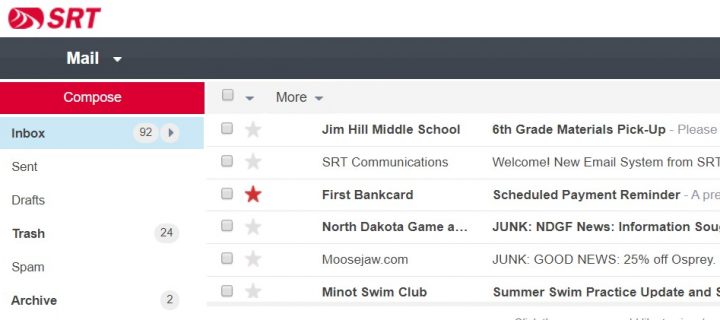
Once logged in, the new email system will load your saved email, folders contacts.  Depending on how much you have saved, this process could take a few minutes.  To update your message list and see progress, click the inbox folder or log out and log back in again.  See below.
Do you have a Minot.com Email Address?

Your minot.com email address will still work on the new system, but you may need to update your email client’s server settings.​  See Server Settings below.

Server Settings

Do you have the supported server settings in your email client? Below are the addresses and ports of the email system.  

Please know that if you have selected SSL, you must use an SSL supporting port.

  • Incoming POP3 Server: pop3.srt.com
    • POP3 Port: 995 (SSL)
    • POP3 Port: 110 (do not select SSL, TLS or Secure Settings when using this port)
  • or Incoming IMAP4 Server: imap.srt.com – preferred incoming server when using multiple devices to check email
    • IMAP4 Port: 993 (SSL) – default and preferred port
    • IMAP4 Port: 143 (do not select SSL, TLS or Secure Settings when using this port)
  • Outgoing SMTP Server: smtp.srt.com
    • SMTP Port: 465 (SSL)
    • SMTP Port: 25 or 587 (do not select SSL, TLS or Secure Settings when using this port)
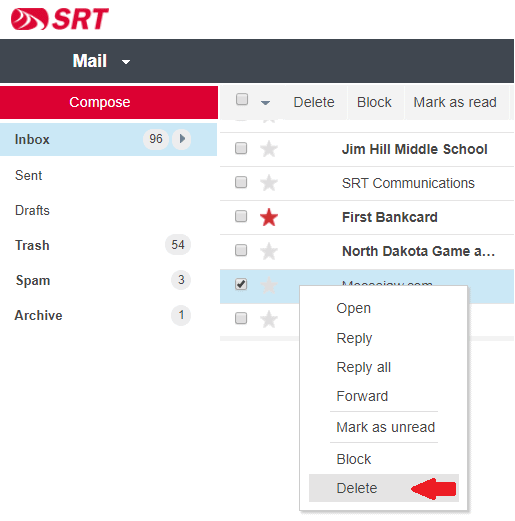
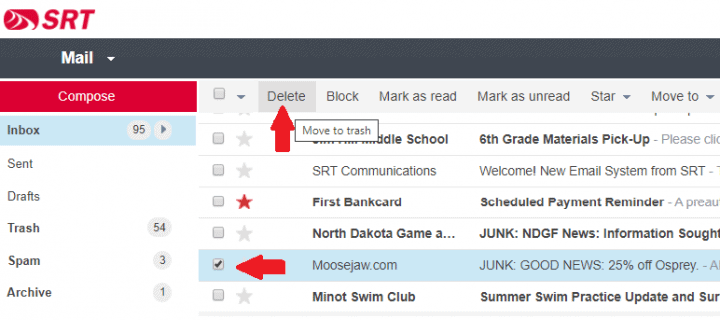
How to Delete a Message Using Webmail​

If you are reading a message, deleting it is a simple click on the pictured trash can.  Webmail offers several ways to delete a message without reading the message.  If you are looking to delete a message without reading it, there are several ways.

1. You can drag your message to the Trash folder or…

2. Right-click an choose Delete from the options menu or…
3. Check-off the message and click Delete from the menu bar
How to View Webmail on a Mobile Device

Webmail is designed for a larger screen and an app was developed as an alternative to Webmail or the mobile devices native email client.  However, there is a way to view Webmail on a mobile device, even if it’s only to get your account “synced” up.

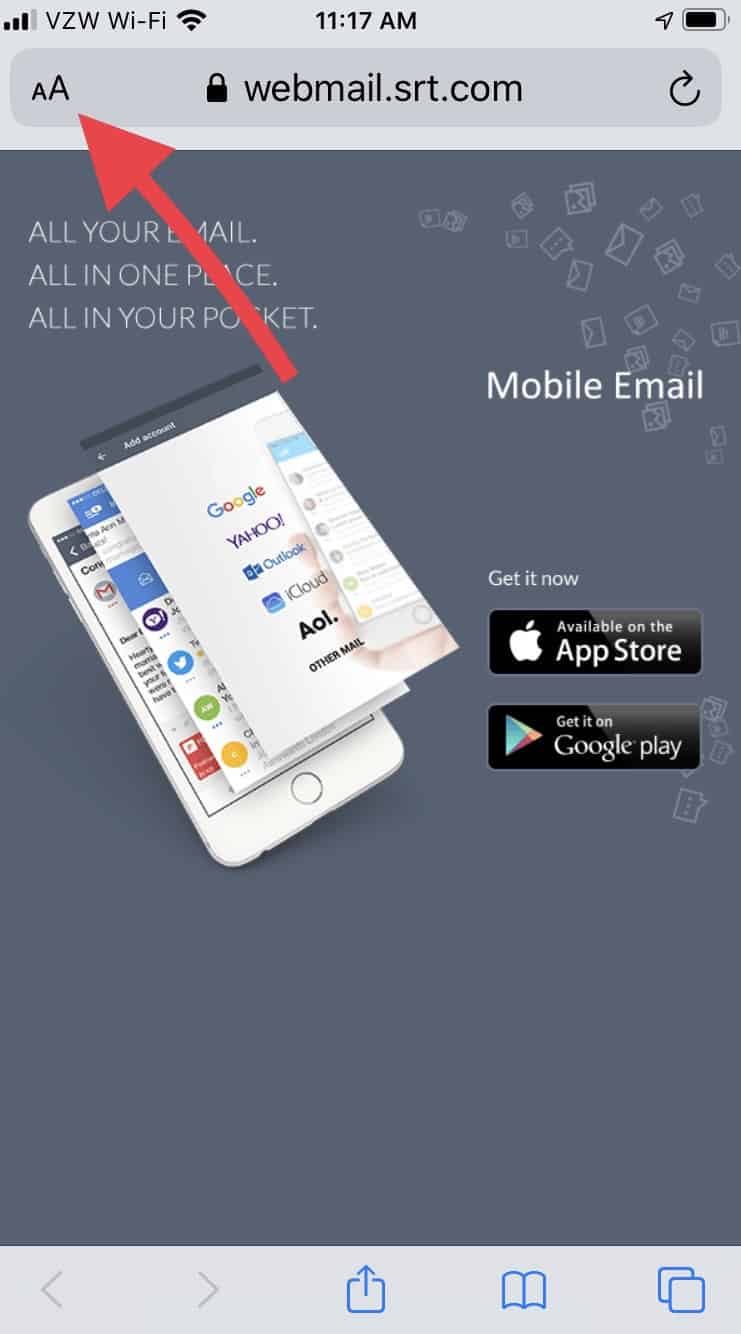
  • Start by opening your mobile device browser.
  • Navigate to https://webmail.srt.com where you will see the suggestion to download the SRT Email app.
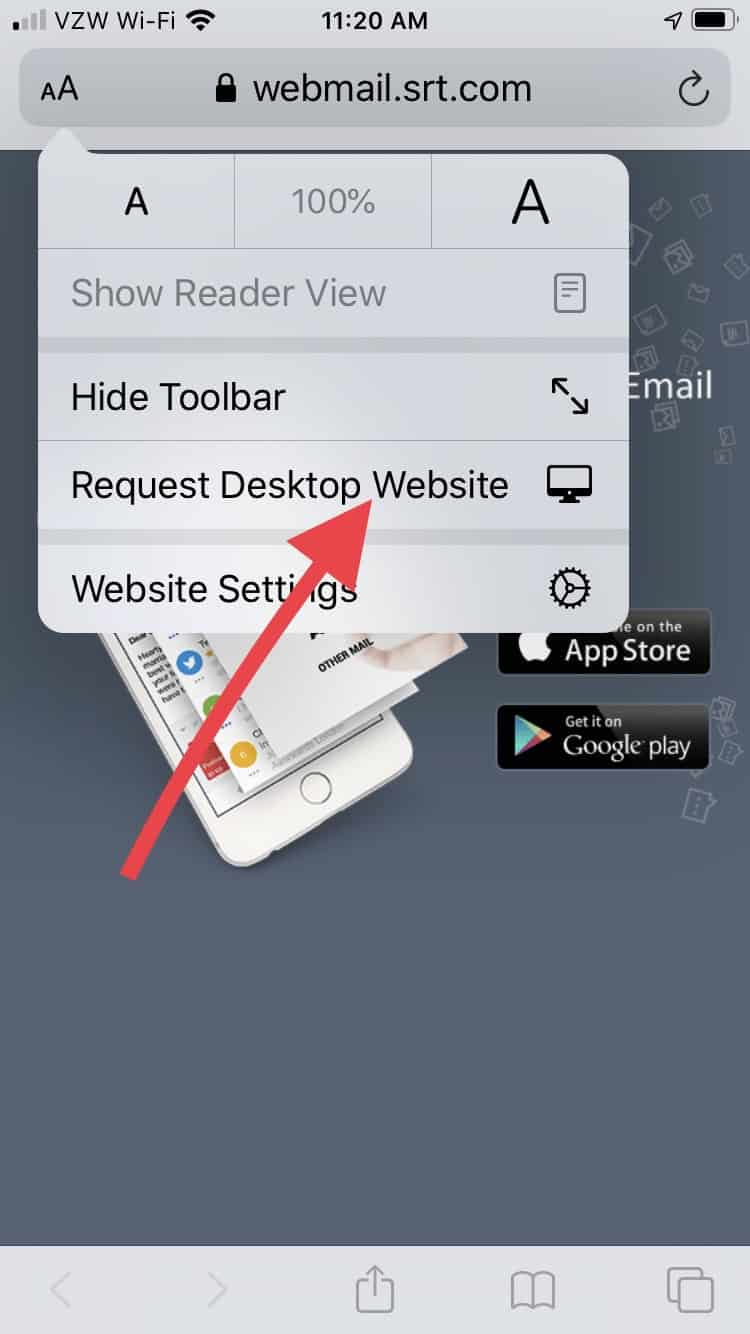
  • Tap the Aa in the browsers address window
  • In the menu that appears, tap Request Desktop Website
  • The new Webmail login should load for you to continue
  • Please consider downloading the app

Mobile Browser

Where is Junk Email and Spam?​

A noticeable change with the new system is where Junk Email or Spam is placed.   By default, a Spam folder exists for every email account.  Any junk email or spam, is moved to that Spam folder rather than your inbox.  The Spam folder is self-cleaning.  Once a message has been in the Spam folder for over seven days, it is deleted.

If your email client isn’t set up to display the Spam folder, you can find it in Webmail at https://webmail.srt.com.  

Daily Digests​

The new system does not send out a Daily (or Weekly) Digest of junk email.  Junk email and spam are shifted over to a Spam folder.  The system that produced the Daily Digests will be available through mid-August, 2020.  If you are looking for an older message that may have been flagged as junk or spam, visit https://edgewave.srt.com to look through old junk email which will be available until the end of August 2020.

PrevPreviousNEW WEBMAIL – SIGNATURE
NextTony Best Promoted To Director of Field OperationsNext

NEW WEBMAIL – SIGNATURE

May 07 2020

NEW WEBMAIL – SIGNATURE

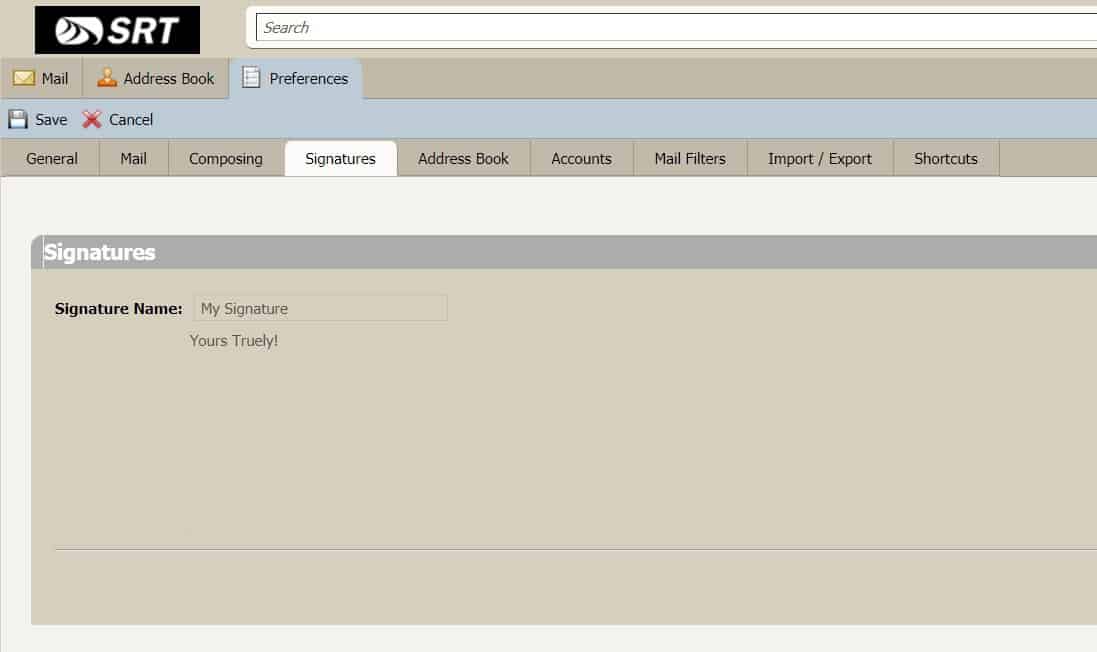
To see your Webmail Signature settings, log into webmail.srt.com and click on Preferences and select the Signatures tab. Your signature and preferences for where it should be placed will be displayed.  See example below.

Signature Zimbra

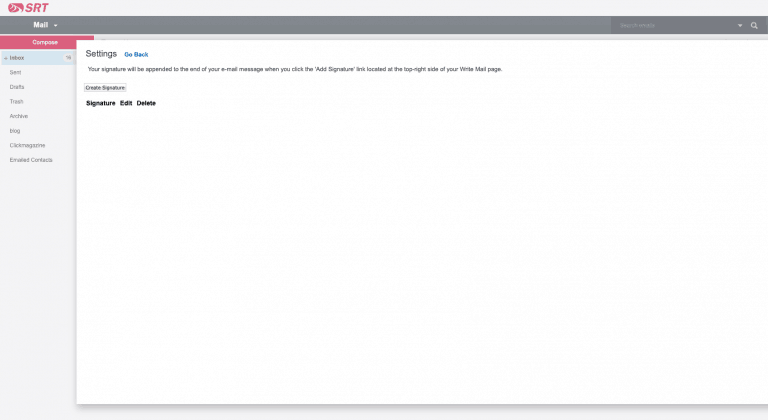
To add and apply a Signature in the new Webmail when it becomes available on May 13, log into webmail.srt.com, open your Settings by clicking the Settings icon [Gear], then click Signatures and the Create Signature button to develop the signature(s) you wish.  To Enable your signature(s), click Go Back and select Mail Preferences and click Automatically Add Signature.  Locate the Automatically Add Signature section and select “Yes” and Save your changes.  See example below.

signature1
signature2
PrevPreviousNEW WEBMAIL – AUTO-REPLY
NextNEW EMAIL SYSTEMNext
  • « Previous Page
  • Page 1
  • …
  • Page 42
  • Page 43
  • Page 44
  • Page 45
  • Page 46
  • …
  • Page 63
  • Next Page »

Footer

Tools and More
HELP & SUPPORT
SPEED TEST
ONLINE DIRECTORY
PAYMENT OPTIONS
LIFELINE PROGRAM

SRT
ABOUT US
SRT CARES
NEWS
JOIN OUR TEAM
LEGAL


701.858.1200
FOLLOW US:
SRT Facebook  SRT LinkedIn  SRT Twitter  SRT Instagram
SRT YouTube

Generic filters
Exact matches only

This institution is an equal opportunity provider and employer. @2026 SRT Communications, Inc. All Rights Reserved.

S R TLogo Header Menu
  • WEBMAIL
  • SMARTHUB
  • INTERNET
  • SECURITY
  • PHONE
  • BUSINESS
  • TV