• Skip to content
  • Skip to footer
  • WEBMAIL
  • SMARTHUB

SRT.COM

  • INTERNET
  • SECURITY
  • PHONE
  • BUSINESS
  • TV

News

NEW EMAIL SYSTEM

May 14 2020

NEW EMAIL SYSTEM

newsarea_newemail

Having Trouble with the New SRT EMail?

We apologize for the inconvenience that the transition to the new SRT email may be causing. We encourage you to contact the 24/7 SRT Internet Help Desk at 701-858-7873 or SRT.com/chat for personal help from a local technician.

The Internet Help Desk is experiencing increased call volume, but will return your call in order.  In the mean time you can also try a few of these troubleshooting tips.

Having Trouble Getting Your Email? Receiving a "404" Page Not Found Error?

Please try logging into https://webmail.srt.com and update your bookmark or favorites.

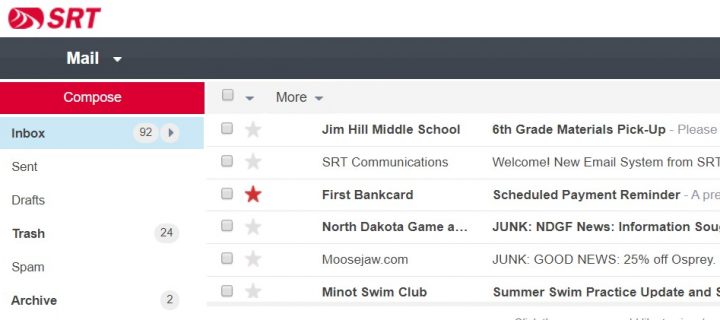
Once logged in, the new email system will load your saved email, folders contacts.  Depending on how much you have saved, this process could take a few minutes.  To update your message list and see progress, click the inbox folder or log out and log back in again.  See below.

Do you have a Minot.com Email Address?

Your minot.com email address will still work on the new system, but you may need to update your email client’s server settings.​  See Server Settings below.

Server Settings

Do you have the supported server settings in your email client? Below are the addresses and ports of the email system.  

Please know that if you have selected SSL, you must use an SSL supporting port.

  • Incoming POP3 Server: pop3.srt.com
    • POP3 Port: 995 (SSL)
    • POP3 Port: 110 (do not select SSL, TLS or Secure Settings when using this port)
  • or Incoming IMAP4 Server: imap.srt.com – preferred incoming server when using multiple devices to check email
    • IMAP4 Port: 993 (SSL) – default and preferred port
    • IMAP4 Port: 143 (do not select SSL, TLS or Secure Settings when using this port)
  • Outgoing SMTP Server: smtp.srt.com
    • SMTP Port: 465 (SSL)
    • SMTP Port: 25 or 587 (do not select SSL, TLS or Secure Settings when using this port)
How to Delete a Message Using Webmail​

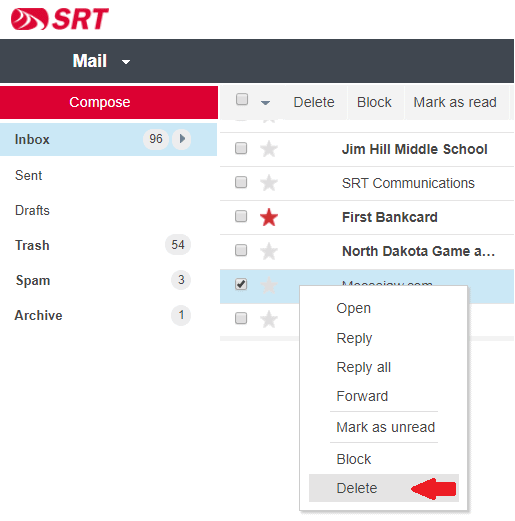
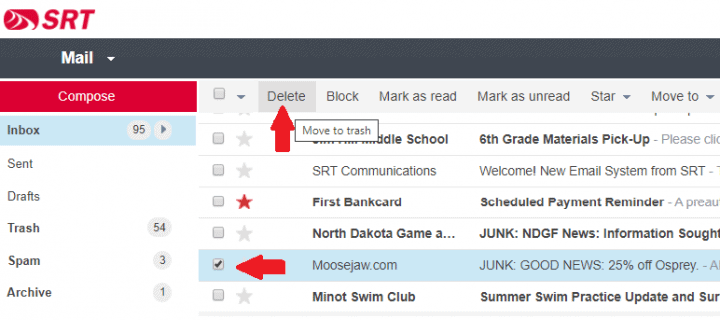
If you are reading a message, deleting it is a simple click on the pictured trash can.  Webmail offers several ways to delete a message without reading the message.  If you are looking to delete a message without reading it, there are several ways.

1. You can drag your message to the Trash folder or…

2. Right-click an choose Delete from the options menu or…

3. Check-off the message and click Delete from the menu bar

How to View Webmail on a Mobile Device

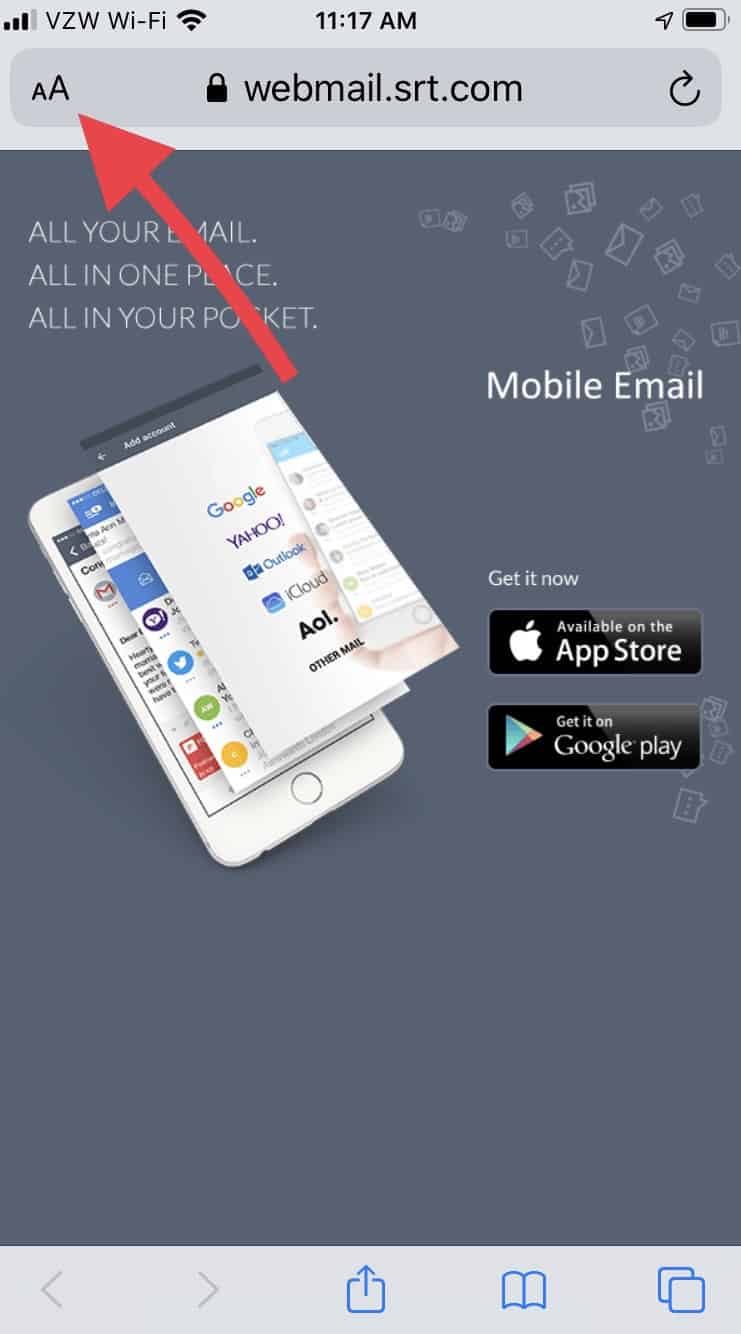
Webmail is designed for a larger screen and an app was developed as an alternative to Webmail or the mobile devices native email client.  However, there is a way to view Webmail on a mobile device, even if it’s only to get your account “synced” up.

  • Start by opening your mobile device browser.
  • Navigate to https://webmail.srt.com where you will see the suggestion to download the SRT Email app.
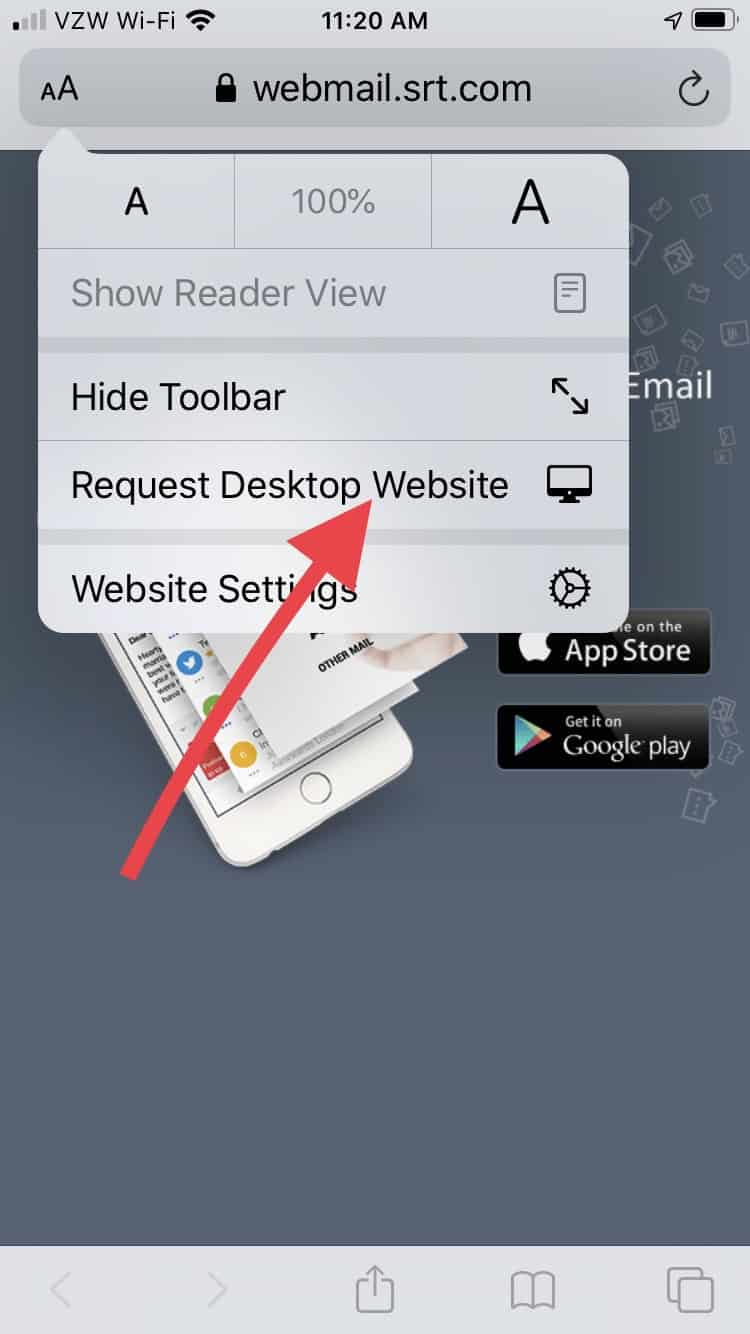
  • Tap the Aa in the browsers address window
  • In the menu that appears, tap Request Desktop Website
  • The new Webmail login should load for you to continue
  • Please consider downloading the app

Mobile Browser

Where is Junk Email and Spam?​

A noticeable change with the new system is where Junk Email or Spam is placed.   By default, a Spam folder exists for every email account.  Any junk email or spam, is moved to that Spam folder rather than your inbox.  The Spam folder is self-cleaning.  Once a message has been in the Spam folder for over seven days, it is deleted.

If your email client isn’t set up to display the Spam folder, you can find it in Webmail at https://webmail.srt.com.  

Daily Digests​

The new system does not send out a Daily (or Weekly) Digest of junk email.  Junk email and spam are shifted over to a Spam folder.  The system that produced the Daily Digests will be available through mid-August, 2020.  If you are looking for an older message that may have been flagged as junk or spam, visit https://edgewave.srt.com to look through old junk email which will be available until the end of August 2020.

PrevPreviousNEW WEBMAIL – SIGNATURE
NextTony Best Promoted To Director of Field OperationsNext

NEW WEBMAIL – SIGNATURE

May 07 2020

NEW WEBMAIL – SIGNATURE

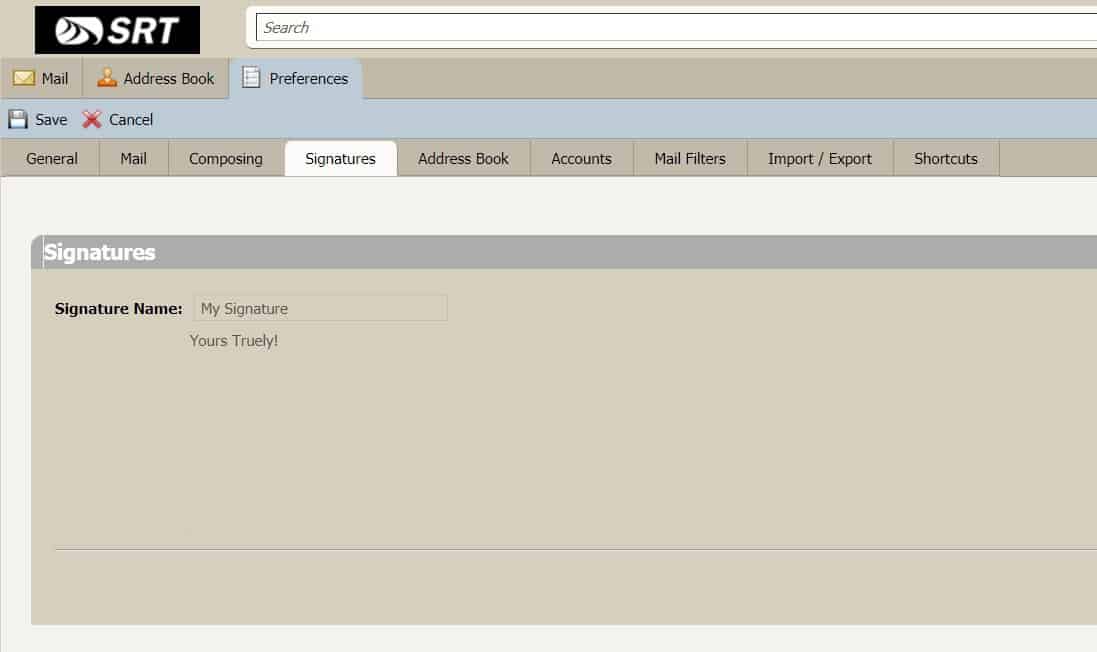
To see your Webmail Signature settings, log into webmail.srt.com and click on Preferences and select the Signatures tab. Your signature and preferences for where it should be placed will be displayed.  See example below.

Signature Zimbra

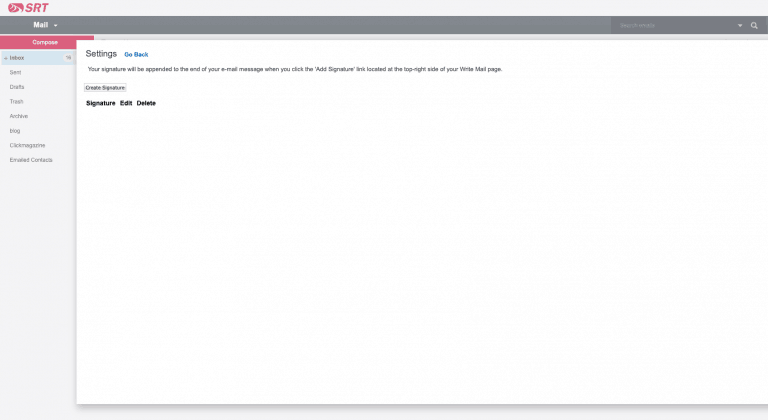
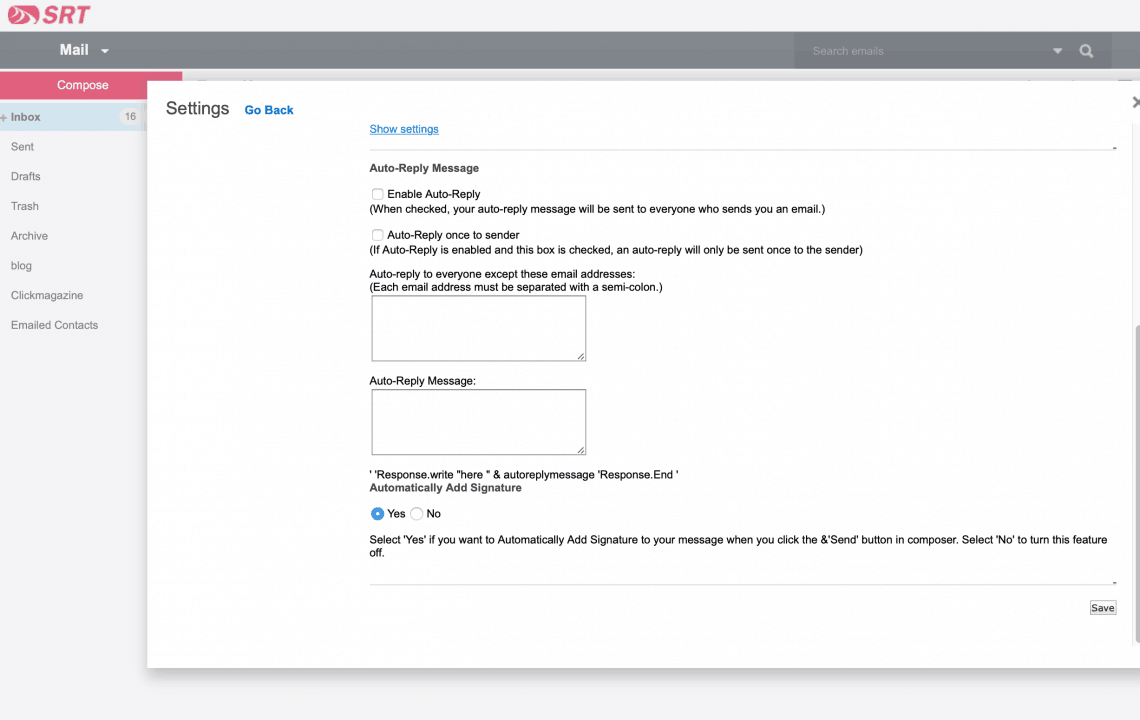
To add and apply a Signature in the new Webmail when it becomes available on May 13, log into webmail.srt.com, open your Settings by clicking the Settings icon [Gear], then click Signatures and the Create Signature button to develop the signature(s) you wish.  To Enable your signature(s), click Go Back and select Mail Preferences and click Automatically Add Signature.  Locate the Automatically Add Signature section and select “Yes” and Save your changes.  See example below.

signature1
signature2
PrevPreviousNEW WEBMAIL – AUTO-REPLY
NextNEW EMAIL SYSTEMNext

NEW WEBMAIL – MAIL FILTERS

May 07 2020

NEW WEBMAIL – MAIL FILTERS

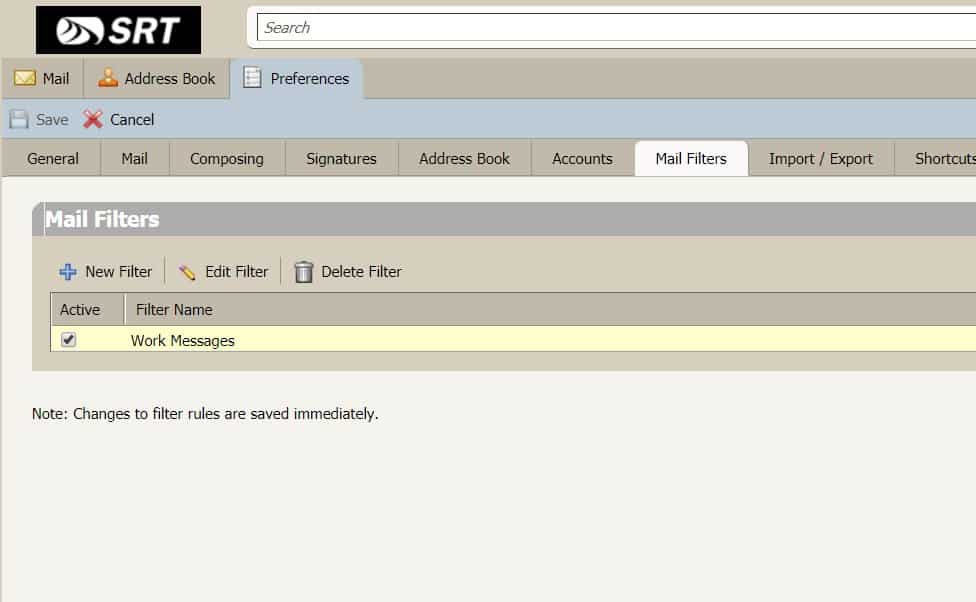
To see your Webmail Mail Filters settings, log into webmail.srt.com and click on Preferences and select the Mail Filters tab.  Your list of filters should appear in the tab.  Double-click the filter you wish to observe.  See example below.

Mail Filters Zimbra

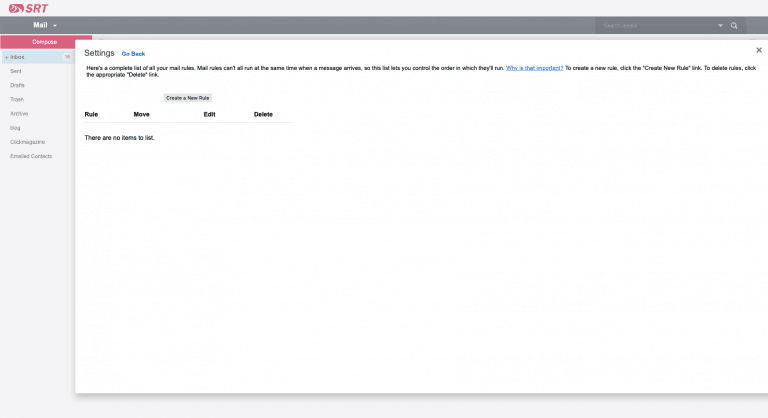
To add and apply Rules – as they’re called – in the new Webmail when it becomes available on May 13, log into webmail.srt.com, open your Settings by clicking the Settings icon [Gear], then click Rules and the Create a New Rule button to develop the Rule(s) you wish and click Save. 

rules
PrevPreviousSusanne Hoskin Promoted To Human Resources Administrator
NextNEW WEBMAIL – AUTO-REPLYNext

NEW WEBMAIL – AUTO-REPLY

May 07 2020

NEW WEBMAIL – AUTO-REPLY

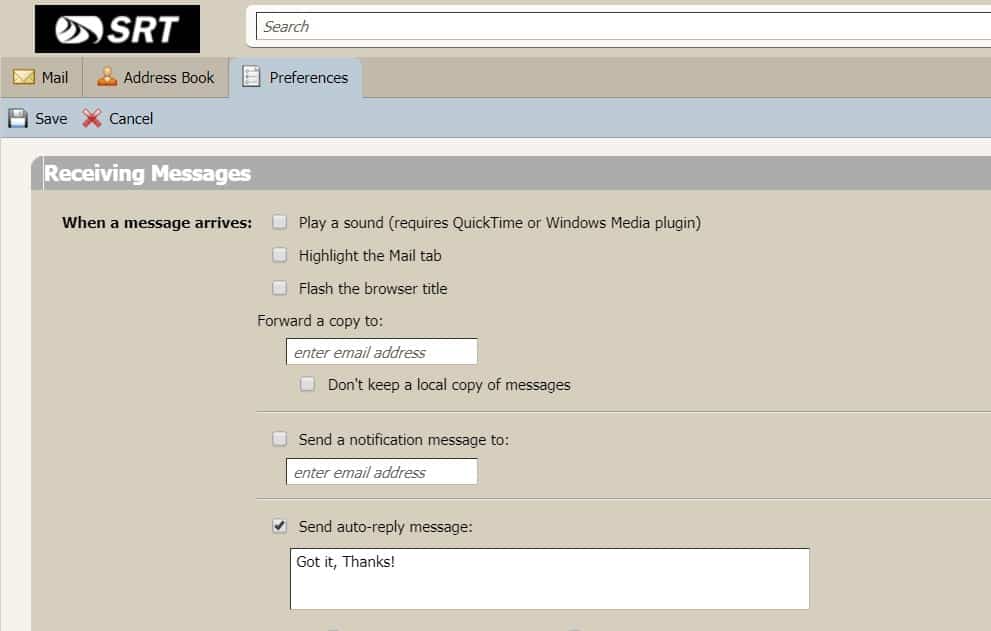
To see your Webmail Auto-Reply settings, log into webmail.srt.com and click on Preferences and select the Mail tab. Your settings for Auto-Reply are in the Receiving Messages section.  See example below.

Auto-reply Zimbra

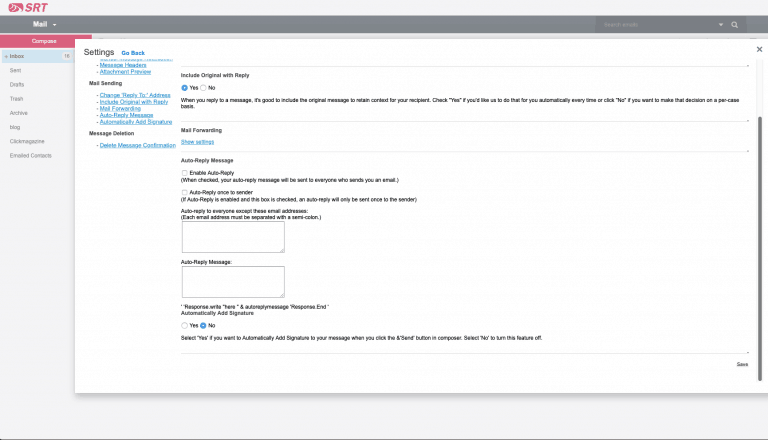
To add an auto-reply in the new Webmail when it becomes available on May 13, log into webmail.srt.com, open your Setting by clicking the Settings icon [Gear], then click Mail Preferences and click Auto-Reply Message.  Locate the Auto-Reply Message section, Click Enable Auto-Reply, add your reply text and click Save.  See example below.

autoreply

Susanne Hoskin Promoted To Human Resources Administrator

May 04 2020

Susanne Hoskin Promoted To Human Resources Administrator

MINOT, ND – SRT is pleased to announce the promotion of Susanne Hoskin to Human Resources Administrator. In her new role, Hoskin will oversee the hiring of new employees, employee benefit programs, and ensure legal compliance regarding participation in state and federal government programs. She was previously a part of the Human Resources Department and looks forward to playing a key role on the executive team in her new position.

“We are proud to have been able to fill this position with a current SRT employee that we are confident will make an immediate positive impact on the company in her new role. Susanne has proven her dedication over the course of her time at SRT and has been furthering her education in preparation for her new role. We are glad to add her as a member of our executive staff moving forward” said SRT General Manager and CEO Steve Lysne.

Hoskin previously served as SRT’s Safety and Training Coordinator. She comes with plenty of experience related to her new position, through continued education and hands on work experience. She replaces Nancy Davis, who retired last week.

Susanne is an active board member and secretary of the Magic City Lions, a member of Minot Area Safety Association, and has been an SRT employee for 23 years. She is a Maxbass, North Dakota native and a graduate of Bismarck State College.

SRT Communications located in Minot, North Dakota is the state’s largest telecommunications cooperative. SRT services include Internet, Security, TV, Phone and Business Services and has served north central North Dakota since 1951, employs nearly 200 people, and serves over 40,000 customers.

###

PrevPreviousService Affecting Cable Cut
NextNEW WEBMAIL – MAIL FILTERSNext
  • « Previous Page
  • Page 1
  • …
  • Page 92
  • Page 93
  • Page 94
  • Page 95
  • Page 96
  • …
  • Page 120
  • Next Page »

Footer

Tools and More
HELP & SUPPORT
SPEED TEST
ONLINE DIRECTORY
PAYMENT OPTIONS
LIFELINE PROGRAM

SRT
ABOUT US
SRT CARES
NEWS
JOIN OUR TEAM
LEGAL


701.858.1200
FOLLOW US:
SRT Facebook  SRT LinkedIn  SRT Twitter  SRT Instagram
SRT YouTube

Generic filters
Exact matches only

This institution is an equal opportunity provider and employer. @2026 SRT Communications, Inc. All Rights Reserved.

S R TLogo Header Menu
  • WEBMAIL
  • SMARTHUB
  • INTERNET
  • SECURITY
  • PHONE
  • BUSINESS
  • TV